设为首页
优惠IDC
收藏本站
六狼博客
六狼论坛
开启辅助访问
切换到窄版
用户名
Email
自动登录
找回密码
密码
登录
立即注册
只需一步,快速开始
只需一步,快速开始
快捷导航
门户
首页
BBS
云计算
大数据
手机
移动开发android,ios,windows phone,windows mobile
编程
编程技术java,php,python,delphi,ruby,c,c++
前端
WEB前端htmlcss,javascript,jquery,html5
数据库
数据库开发Access,mysql,oracle,sql server,MongoDB
系统
操作系统windows,linux,unix,os,RedHat,tomcat
架构
项目管理
软件设计,架构设计,面向对象,设计模式,项目管理
企业
服务
运维实战
神马
搜索
搜索
热搜:
php
java
python
ruby
hadoop
sphinx
solr
ios
android
windows
centos
本版
帖子
用户
六狼论坛
»
首页
›
移动开发
›
Android开发
›
Android-PopupWindow弹出对话框
返回列表
查看:
106
|
回复:
0
Android-PopupWindow弹出对话框
[复制链接]
daniu111
daniu111
当前离线
积分
32
窥视卡
雷达卡
升级
64%
当前用户组为
童生
当前积分为
32
, 升到下一级还需要 18 点。
8
主题
8
主题
8
主题
童生
童生, 积分 32, 距离下一级还需 18 积分
童生, 积分 32, 距离下一级还需 18 积分
积分
32
发消息
楼主
|
发表于 2012-12-19 23:08:35
|
显示全部楼层
|
阅读模式
Android-PopupWindow弹出对话框
<div class="postbody"><div id="cnblogs_post_body">Android的对话框常用的有两种:PopupWindow和AlertDialog。PopupWindow顾名思义为弹出菜单,不同于AlertDialog对话框,PopupWindow弹出的
位置可以很多变化
,按照有无偏移分,可以分为
无偏移和偏移
两种;按照参照类型不同又可以分为两种:
相对某个控件(Anchor锚)的位置和父容器内部的相对位置
。具体如下:
函数
简介
showAsDropDown(
View
anchor)
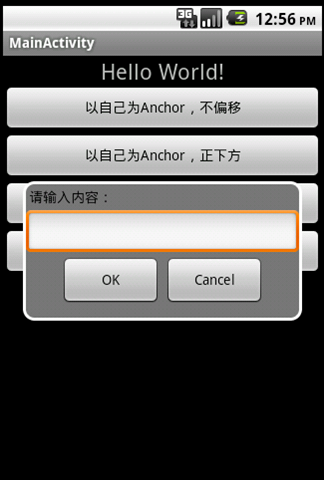
相对某个控件的位置(正左下方),无偏移
showAsDropDown(
View
anchor, int xoff, int yoff)
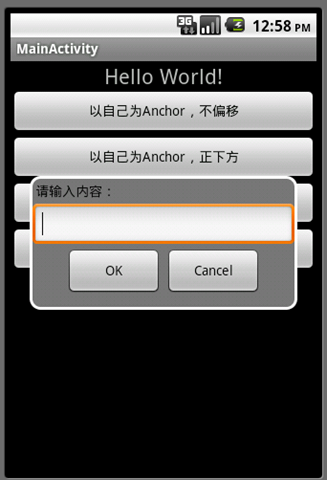
相对某个控件的位置,有偏移
showAtLocation(
View
parent, int gravity, int x, int y)
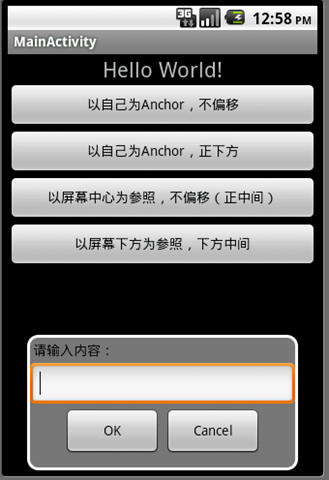
父容器容器相对位置,例如正中央Gravity.CENTER,下方Gravity.BOTTOM等
下面是运行程序截图:
程序代码:
布局文件:main.xml
<div class="cnblogs_code" style="background-color: #f5f5f5; width: 558px; height: 726px; border: #cccccc 1px solid; padding: 5px;">
<
LinearLayout
xmlns:android
="http://schemas.android.com/apk/res/android"
xmlns:tools
="http://schemas.android.com/tools"
android:layout_width
="match_parent"
android:layout_height
="match_parent"
android:orientation
="vertical"
android:id
="@+id/layout"
>
<
TextView
android:id
="@+id/text_view"
android:layout_width
="fill_parent"
android:layout_height
="wrap_content"
android:gravity
="center"
android:text
="@string/hello"
android:textSize
="22dp"
/>
<
Button
android:id
="@+id/button_test1"
android:layout_width
="fill_parent"
android:layout_height
="wrap_content"
android:text
="以自己为Anchor,不偏移"
/>
<
Button
android:id
="@+id/button_test2"
android:layout_width
="fill_parent"
android:layout_height
="wrap_content"
android:text
="以自己为Anchor,正下方"
/>
<
Button
android:id
="@+id/button_test3"
android:layout_width
="fill_parent"
android:layout_height
="wrap_content"
android:text
="以屏幕中心为参照,不偏移(正中间)"
/>
<
Button
android:id
="@+id/button_test4"
android:layout_width
="fill_parent"
android:layout_height
="wrap_content"
android:text
="以屏幕下方为参照,下方中间"
/>
</
LinearLayout
>
回复
使用道具
举报
提升卡
置顶卡
沉默卡
喧嚣卡
变色卡
千斤顶
显身卡
返回列表
高级模式
B
Color
Image
Link
Quote
Code
Smilies
您需要登录后才可以回帖
登录
|
立即注册
本版积分规则
发表回复
回帖后跳转到最后一页
浏览过的版块
ASP.NET
Copyright © 2008-2020
六狼论坛
(https://it.6wolf.com) 版权所有 All Rights Reserved.
Powered by
Discuz!
X3.4
京ICP备14020293号-2
本网站内容均收集于互联网,如有问题请联系
QQ:389897944
予以删除
快速回复
返回顶部
返回列表
 京ICP备14020293号-2
本网站内容均收集于互联网,如有问题请联系QQ:389897944予以删除
京ICP备14020293号-2
本网站内容均收集于互联网,如有问题请联系QQ:389897944予以删除


 窥视卡
窥视卡 雷达卡
雷达卡


 楼主
楼主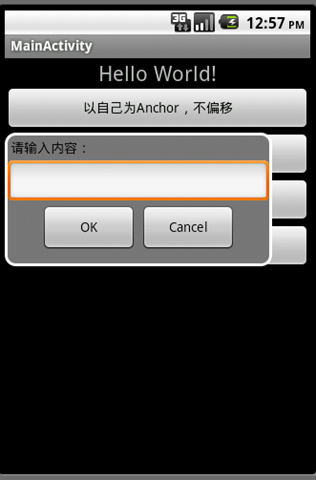
 提升卡
提升卡 置顶卡
置顶卡 沉默卡
沉默卡 喧嚣卡
喧嚣卡 变色卡
变色卡 千斤顶
千斤顶 显身卡
显身卡