|
|
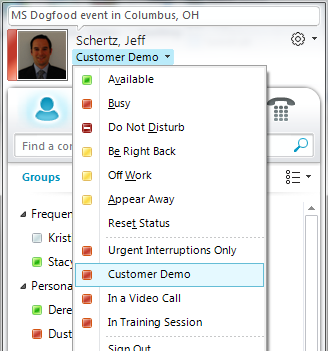
<div id="cnblogs_post_body">自定义如下XML:
<customStates>
<customState ID="1" availability="Busy">
<activity LCID="1033">Urgent Interruptions Only</activity>
</customState>
<customState ID="2" availability="Busy">
<activity LCID="1033">Customer Demo</activity>
</customState>
<customState ID="3" availability="Busy">
<activity LCID="1033">In a Video Call</activity>
</customState>
<customState ID="4" availability="Busy">
<activity LCID="1033">In Training Session</activity>
</customState>
</customStates>
- Create a new REG_DWORD value named EnableSIPHighSecurityMode in the Communicator Software Policies key shown below. Enter the value of &lsquo;0&rsquo; to disable this security mode.
Path: HKEY_LOCAL_MACHINE\SOFTWARE\Policies\Microsoft\Communicator
Name: EnableSIPHighSecurityMode
Value: 0
- Create a new REG_SZ value named CustomStateURL in the same key as shown below. Enter the absolute path to the presence.xml file using the file:/// URL format.
Path: HKEY_LOCAL_MACHINE\SOFTWARE\Policies\Microsoft\Communicator
Name: CustomStateURL
Value: file:///C:/Windows/presence.xml
- Exit and restart the Lync client to pick up the configuration changes and then pull down the status menu to locate the new choices.
|
|
 京ICP备14020293号-2
本网站内容均收集于互联网,如有问题请联系QQ:389897944予以删除
京ICP备14020293号-2
本网站内容均收集于互联网,如有问题请联系QQ:389897944予以删除


 窥视卡
窥视卡 雷达卡
雷达卡


 楼主
楼主
 提升卡
提升卡 置顶卡
置顶卡 沉默卡
沉默卡 喧嚣卡
喧嚣卡 变色卡
变色卡 千斤顶
千斤顶 显身卡
显身卡